
Introduction: Why You Need to Track Your Car
We have all felt that sudden drop in our stomachs. You walk back to where you swore you left your parked car, and you see nothing but empty asphalt. Maybe you just lost your bearings in a crowded mall lot. Or, in a much worse scenario, you might be dealing with a stolen car. In moments like that, speed is everything. The good news is that vehicle security has changed massively over the last few years. Keeping an eye on your car’s real-time location doesn’t mean you have to sign up for expensive monthly subscriptions or pay a mechanic to rewire your dashboard anymore.
Modern GPS technology has moved way past specialized, hard-to-get hardware. Back in the day, traditional setups forced you to hide a bulky, dedicated tracking device somewhere inside the chassis. Today, the solution is likely already in your pocket or built right into your car’s software. This guide breaks down exactly how you can secure your vehicle using free methods that work. No premium price tags here – just actionable steps to make sure you never lose track of your ride again.
Method 1: Use Your Car’s Built-In GPS System
Got a car made in the last ten years? Then there is a very good chance it is already packing a built-in GPS. Back in the day, tech like this was something you only saw in mid to high-end models, but times have changed. Now, it is practically standard industry-wide.
The system works thanks to a dedicated GPS chip hardwired right into the vehicle. Because of this, you usually get a much stronger, more reliable signal than you would with a portable third-party gadget.
Not sure if your ride has it? A quick look at the manual should tell you. If you can’t find the info there, just reach out to the after-sales service department at your local dealer. Once you know you are compatible, you can generally access the tracking features through a specific vehicle manufacturer app. Most of the big players have their own connectivity suites ready to go, such as:
- MyChevrolet (for GM vehicles)
- FordPass (for Ford owners)
- Toyota App (for Toyota and Lexus models)
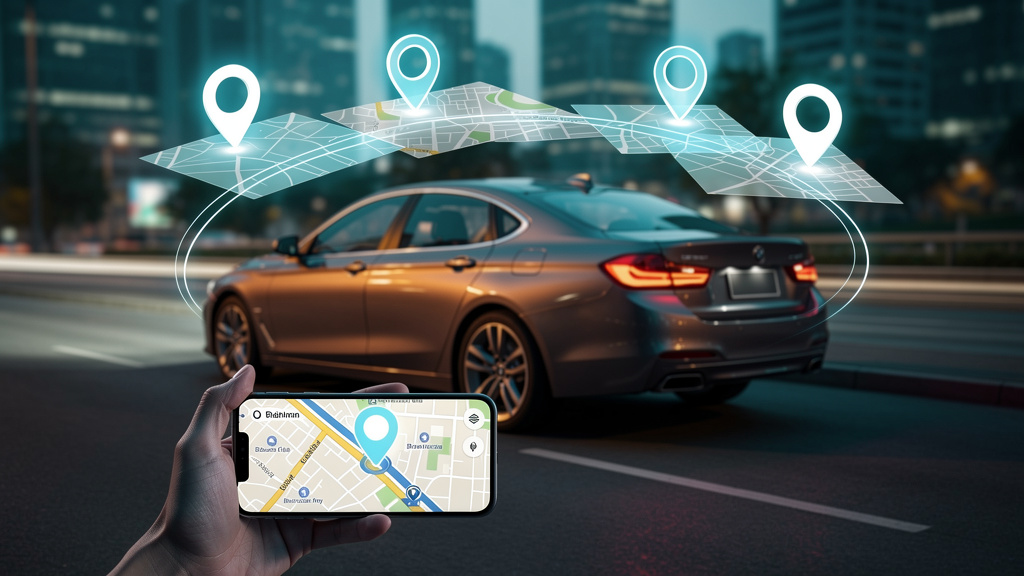
The process is simple. You just sync your smartphone with the official app and, boom – you can see your car’s location on a digital map in real-time. Since it taps into the car’s native systems, the tracking is super accurate and totally discreet. On top of that, many of these apps let you set up geofencing alerts, helping you stay in the loop about your vehicle’s movements 24/7.
Method 2: Turn an Old Phone into a DIY GPS Tracker
Do you have a spare smartphone sitting in a drawer gathering dust? Don’t let it go to waste. You can actually repurpose that device into a budget-friendly vehicle tracker. By using the standard Location service features already built into modern operating systems, you get reliable real-time tracking without ever needing to buy expensive, dedicated hardware.
Step 1: Prep the Device
First, grab that old phone – whether it is an Android or an iPhone – and do a factory reset to keep things running smooth. Next, you need to install a valid SIM card with a data plan. If that’s not an option, make sure it connects to a stable mobile hotspot. An active internet connection is absolutely required here; without it, the device cannot transmit its coordinates to the cloud.
Step 2: Configure Tracking Settings
Now, let’s set up the software. If you are using an Android, sign in to your Google account and enable the Find My Device feature. For iOS users, log in to your Apple ID and toggle on iCloud Find Devices. In your settings, double-check that the Location service is set to “High Accuracy” mode. This ensures you get specific positioning data rather than just a general area.
Step 3: Installation and Power
You need to stash the device somewhere discreet, like the glove box or underneath a seat. However, constant GPS and data usage will drain a battery fast. Because of this, you must connect the phone to a permanent power source. Use a USB car charger or a hardwired 12V-to-5V converter so the phone stays charged anytime the engine is running.
Step 4: Monitor the Location
Tracking your vehicle is the easy part. Simply log in to the Find My Device website or open the App on another Apple device. Just like that, you can see the car’s movement on a map as it happens.
CRITICAL WARNING: This DIY solution depends entirely on the state of the phone. If it loses its power source or the internet connection drops out, you won’t get live updates. Instead, you will be left viewing the last known location. Also, be careful where you hide it – placing it too deep inside metal components might block the GPS signal.
Method 3: Save Your Parking Spot with Maps Apps
You probably already have the tools to solve this problem right in your pocket. Using Google Maps or Apple Maps is one of the easiest ways to handle this. It is a manual trick, sure, but it works wonders. You basically drop a digital anchor to save parking location data with total precision. That said, remember that this is just a static marker. It is perfect for finding where you left your vehicle, but it won’t help you track a moving car in real-time.
Saving Your Spot with Google Maps
Google makes this incredibly simple. Once you kill the engine, open the app and find the little blue dot showing where you are currently standing. Give that blue dot a quick tap. A menu will pop up, and you just need to select “Save parking” (sometimes listed as “Set as parking location”). Just like that, a parking pin shows up on your screen. When you are ready to leave, tap the search bar – it usually suggests “Parking location” immediately – or find the marker on the map to get walking directions straight back to your driver’s seat.
Recording Your Location with Apple Maps
If you live in the iOS ecosystem, Apple Maps does the exact same thing so you don’t end up wandering around a garage for twenty minutes. Here is the drill: stop the car, open the app, and tap the blue dot indicating your position. From the menu that appears, look for “Mark My Location” or choose to “Drop Pin” manually. This leaves a specific Dropped Pin right at your coordinates. Ready to head home? You can find your spot again by checking your recent searches or just tapping that pin to pull up directions. It is simple, free, and works best in big outdoor lots where the GPS signal is clear.
Method 4: Leverage an Insurance Black Box
If you need a tracking solution that’s already integrated into the vehicle, the black box provided by many insurance companies is a surprisingly effective tool. These were originally built to monitor driving behavior – watching things like acceleration, hard braking, and cornering speed – to help calculate premium discounts. However, that’s not all they do.
These telematics devices also work as sophisticated GPS trackers. Because they are usually hardwired into the vehicle’s battery or OBD-II port, you get consistent, reliable data transmission regarding the car’s movements.
To use this for tracking, the policyholder just needs to reach out to their provider. Ask them if your current plan includes a telematics device. In many cases, these units allow for stolen vehicle recovery, which means the insurer can pull up the real-time location of the car during an emergency. While the main goal for the company is risk assessment, a lot of modern providers now give you access to this data through a simple app or an online insurer dashboard.
When you talk to your agent, keep these points in mind:
- Access Permissions: Getting direct access as the owner might require a specific hardware reader or a premium service tier.
- Theft Recovery: Most black box systems are specifically designed to help law enforcement find the car if it goes missing.
- Data Transparency: Double-check exactly what telematics data is being shared to make sure it matches your privacy expectations.
By using the hardware your insurance company already supplied, you can keep an eye on a teen driver’s safety and location without having to buy and install extra third-party equipment.
Method 5: Access Fleet Management Services
If you happen to be behind the wheel of a company vehicle, things work a little differently. Location data here isn’t usually managed by a simple phone app. Instead, it flows through professional fleet management systems. Businesses rely on this specialized tracking software to keep eyes on their assets, often using hardware wired right into the car.
This tech does more than just show a dot on a map. It powers the company’s route planning and helps support their day-to-day operational services. So, if you need to track a corporate car, you can’t just download an app from the store. You have to go straight to the source.
Talk to your employer or the fleet manager to get the info you need. They control the secure dashboards that generate detailed logs and real-time geo-location notifications. Just keep in mind that access isn’t automatic – it depends heavily on your specific permissions and the rules set by the business.
- Asset Security: These tools make sure the vehicle stays on the job and follows company rules.
- Driver Access: You won’t get in without the right login credentials from HR or the logistics team.
- Compliance: Employment contracts and privacy laws usually dictate exactly how and when this monitoring happens.
Cheap (Not Free) Alternatives: GPS & Bluetooth Trackers
Sometimes free apps just aren’t enough. Or maybe your child isn’t quite ready for the responsibility of a smartphone. That is where dedicated hardware makes sense. These pocket-friendly gadgets utilize specific wireless systems to give you reliable tracking, all without handing your kid a screen they’ll stare at all day.
GPS Trackers
A dedicated GPS tracker is usually the heavy hitter here. These devices talk directly to a satellite to nail down exact coordinates, meaning they don’t care if there isn’t any Wi-Fi around. That makes them perfect for outdoor adventures or keeping tabs on a location from miles away. You usually have to buy the hardware and pay a small monthly fee for cellular data, but for that price, you get serious accuracy.
- Live Updates: You get location pings every few seconds, even in remote spots.
- Total Independence: It works on its own and doesn’t need to be tethered to a parent’s phone to function.
- Safety First: Lots of models come with a physical SOS button your child can press for help.
Bluetooth Trackers (e.g., AirTag)
If you hate the idea of another monthly subscription, a Bluetooth tracker is likely your best bet. A device like the Apple AirTag or a Tile works differently than GPS. It connects to a Personal Area Network (PAN) to ping devices that are nearby. For example, Apple uses the massive Find My network. This relies on millions of other people’s iPhones to pick up the signal and anonymously bounce the location back to you.
- One-and-Done Cost: You pay for the tag once, and that is it.
- Crowd Power: Since there are compatible phones everywhere, location updates in cities are surprisingly frequent.
- Easy Setup: It pairs with your phone’s native system instantly.
What Doesn’t Work: Tracking by License Plate or VIN
We see it in movies all the time. The hero types a code into a laptop, and a blinking dot appears on a map. In the real world, however, things do not work that way. The hard truth is that private individuals cannot track a car’s live location just by knowing the license plate number or the Vehicle Identification Number (VIN). These identifiers tie back to government-run restricted databases. Getting access to any sort of tracking data through these channels is strictly reserved for law enforcement and authorized agencies.
Think of a VIN like a car’s medical history chart. Its job is to tell you about the vehicle’s manufacturing specs, recall alerts, and title status. It is definitely not a GPS beacon. The same logic applies to plates. While authorities use them for criminal investigations or toll scanning, that data is locked down. It is not legally accessible to the general public. If you stumble across an online tool claiming it can give you a “live” location, don’t take the bait. You will likely just get outdated registration records or fall for a scam.
So, what should you do if your car actually goes missing? Speed is everything here. Instead of searching for loopholes, follow these steps:
- Make it official: File a police report immediately. This is the only way to get things moving. Only law enforcement has the authority to flag a license plate number in the national system or request recovery data from the manufacturer.
- Check your own gadgets: If you had a tracker active in the car, now is the time to use it. Rely on the affordable methods we discussed earlier, like AirTags or dedicated GPS hardware.
- Call your agent: Contact your insurance provider and give them the full Vehicle Identification Number to get a theft claim started.
Administrative numbers are great for identification, but they are useless for real-time tracking unless you have a warrant. To truly protect your property, you have to rely on active GPS solutions rather than government data.
Which Free Tracker Fits Your Life?
Finding the best method to protect your ride really comes down to what gear you already own and what worries you the most. If you are looking for serious vehicle security and actual real-time tracking, digging an old smartphone out of your junk drawer is easily the most versatile DIY route.
On the other hand, maybe you don’t need constant monitoring. If you just need a bit of parking assistance to locate your car after a grocery run, the standard maps on your phone offer a seamless no cost solution.
To keep things simple, here is a quick cheat sheet:
- Check the Car First: Use Built-in GPS if your manufacturer (like BMW or Tesla) gives you a free tier.
- The DIY Route: Use an Old Smartphone. This is the top choice for 24/7 eyes on your vehicle and helps with stolen car recovery without monthly subscription fees.
- The Commuter’s Choice: Stick to Mapping Apps if you primarily just need to remember where you parked this morning.
- Look for Perks: Check Employer/Insurer offers. Some companies provide telematics devices that track the car and lower your premiums at the same time.
One final reality check: tracking a private car using only a license plate or Chassis Number (VIN) is physically impossible for regular people because of strict privacy laws. Don’t wait until something goes wrong. Pick the tool that fits your lifestyle today so you can relax knowing your car is protected.